



General Product Overview
X-Series Cameras
There are two sub-categories of our latest & greatest X-series cameras; – X-Plus & X-Core. Both of these options utilize the WN7 SoC but do have some slight differences, which we’ve highlighted below in red.
WN7 X-Plus:
- Wide range of megapixel offering (2/4/6/8MP)
- AI-based object classification
- AI-enhanced image quality and compression (WiseNR, Wisestream III)
- WiseIR (adaptive IR), 50M
- Extreme WDR & industry leading low-light
- Modular design for labor efficiency and technology migration
- TLS 1.2, FIPS-140-2
- IP6K9K, POE+
- Dual SD card, Micro USB & CVBS
WN7 X-Core:
- Wide range of megapixel offering (2/4/6/8MP)
- AI-based object classification
- AI-enhanced image quality and compression (WiseNR, Wisestream III)
- WiseIR (adaptive IR), 40M
- Extreme WDR & industry leading low-light
- Traditional camera design w/ enhanced, incorporated mounting plate
- UL CAP
- IP66
- Single SD, Micro USB
WN7 Gen 1 (i.e. XNV-8082R):
These cameras are in the process of going EOL:
-
- XNx-8082R > XNx-8083R
- XNx-9082R > XNx-9083R
First WN7 camera line, released September of 2020
- 6MP and 8MP only
- ½ inch sensor (new versions are 1/3”)
- No AI, pixel based analytics
- Modular only (X-Plus design)
WN5 X-series
Released in 2017 as follow-up SoC to WN3. Included the following enhancements:
- Increase to 5MP from 3MP
- Increase FPS capability to 60FPS from 30FPS
- Addition of audio analytics/sound classification (gunshot, scream, glass break, explosion)
- Addition of Business Intelligence Analytics (people counting, que management, heat mapping – Non-AI)
- Increased WDR 150db WDR (WN3 was 120BD)
- Addition of H.265, along with H.264 & MJPEG (“Triple Codec”)
- Introduction of first smart codec “Wisestream”
- Addition of Micro USB port for ease of install
- Addition of hallway view
WN5 X-plus
Released in 2019
- First modular camera design, same specs as WN5
- First PTRZ single sensor camera
WN5 X-light
- Economic version of WN5 to compete against Axis P3245
- No analytics (video or audio), no OpenPlatform, shorter varifocal lens
WN3
Released in 2013
P-Series Cameras
Multisensors:
- Released in XXXXXX
- Initial release with Quad (4 x2MP PNM-9080VQ, 4 x 5MP PNM-9081VQ), then expanded to 2 headed modular (PNM-7000VD) and interchangeable 2mp/5mp lenses Quad (PNM-9000VQ). Moved next into panoramic (PNM-9020V & PNM-9030V) and 5 headed (9320VQP) multi + PTZ.
- This line re-engineered in XXXX to meet market feature advancements and NDAA compliance:
-
- Addition of PTRZ and IR to quad models.
- Introduced quad covert single body camera (9000QB)
- Introduced cost effective 3x2mp multi (8082VT)
- Dual: expanded to varifocal(3-6MM), added IR, increased resolution to 2x6MP and added AI in C-models
AI
- First AI camera offering from Hanwha, released in 2019.
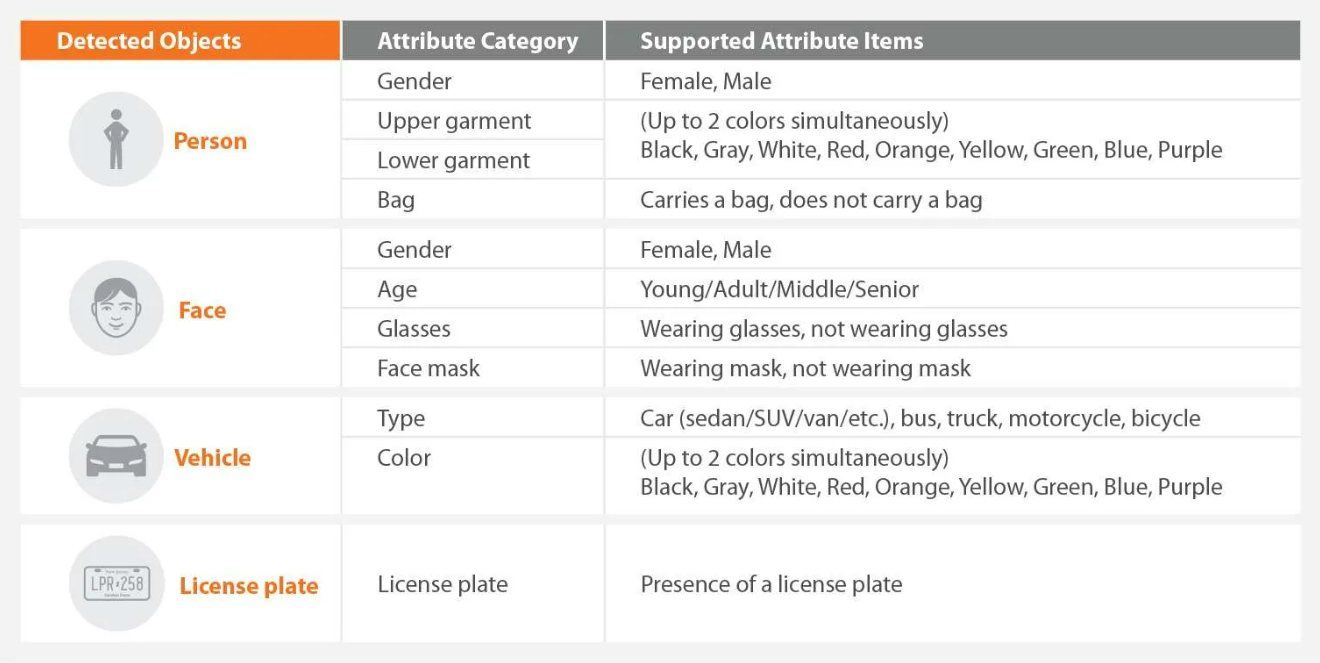
- 2MP & 4K options, these cameras have the ability to perform AI-based object classification, along with metadata/attribute extraction, where information about the objects (see chart below) is streamed to the VMS and made searchable through integrations/plug-ins.
- https://www.youtube.com/watch?v=rBPpeHKPl0w
- Currently works natively w/ Wave, and Genetec & Milestone w/ a plug-in. Others will likely adopt.
Q-Series Cameras
Released in 2017, this is our mid-level camera offering with solid performance, good value, and some higher-end features at an affordable price point. Q-series cameras utilize an Ambarella SoC.
- 2/4/5MP options w/ various form factors (domes, bullets, turrets, fisheyes, & PTZs)
- Various lens options – fixed & MVZ
- 120DB true WDR
- Solid low-light performance (varies slightly per model)
- Basic pixel-based analytics – virtual line, enter/exit, defocus, tamper
- Triple codec (H.265, H.264 & MJPEG) w/ Wisestream II
A-Series Cameras
Released in the summer of 2022 to compete at the lower-end of the market, especially with HIK & Dahua having major struggles with NDAA and the FCC, this is our new “low cost” offering. A-series cameras utilize an Ambarella SoC.
- 2MP/4MP, various form factors (domes, bullets & turrets)
- 120DB true WDR
- Solid low-light performance (varies slightly per model)
- Basic pixel-based analytics – virtual line, enter/exit, defocus, tamper
- Triple codec (H.265, H.264 & MJPEG) w/ Wisestream II
- QR-code enabled to simplify install
T-Series Cameras
This is our vertical-specific/niche camera line consisting of specialty products used in many different, unique applications. Most of these cameras utilize our WN5 chip, with some few exceptions (i.e TNB-9000 8K, high-speed LPR)
- Explosion Proof (C1/D1 classification)
- Thermal
- Long-range perimeter detection
- Radiometric (temperature monitoring)
- EBT (elevated body temperature)
- Self-positioning PTZ
- Anti-ligature corner mount for corrections (3/5MP)
- 8K (32MP)
- High-speed LPR
AHD Cameras
This is our camera analog offering that can be used as a standard definition camera or a high-definition analog (AHD) camera, depending on what recorder/encoder it is being used with.
- 2/4MP, various form factors (domes, bullets, PTZ, zoom box & fisheye)
- Supports AHD, CVI, TVI (high def.) & CVBS (standard def.) video formats
WAVE
Flexible open platform IP video management system that allows users to create a tailored solution for their specific requirements.
- Strategic partnership with NX who developed the software engine
- Not traditional EOM like DW Spectrum
- Over 790 manufacturers devices supported https://wavevms.com/resources/compatible-devices/
- Native integration with SUNAPI 2.0
- Vehicle to sell more cameras and leverage our edge features
- Higher win percentage since RSM controls demo end to end
- Great for existing system migration with minimal hardware requirements
One-time license purchase that is not device MAC address dependent
- No SSA/reoccurring fees after initial license purchase
- Free major revision update
- No tier version, professional license comes with all features/functionality
- Perfect for CAPEX clients
Created and centered around ease of use
- Adaptive layout for customized layout per operator
- Same interface with server, client, and executable for consistency
- Auto discovery of device and primary/secondary stream enroll
- Screen record with audio to embed how to videos for operator reference
- Adaptive scaling for reduction in programming for live view in layout and reduction of processing
- One click updates
Unique architecture – flexible and scalable
- No primary or secondary server which allows for free failover
- No single point of failure via system manager
- Cross platform operating system – Windows, Linux
- Cross platform for client – MAC, windows, Linux
- Light weight server/client download
- 100 servers per system, unlimited systems
- 128 streams per server
- Unlimited clients per system
- Minimum server specification required (i5, 16 GB RAM) https://support.hanwhavisionamerica.com/hc/en-us/articles/115013449908-WAVE-Minimum-Server-Client-Hardware-Specifications
Free mobile client
- IOS and Android supported
- Smart search supported
- Fisheye dewarp supported
Robust rules and event engine
- AI advanced plugin,
- Hanwha camera GUI integrated
- Advanced camera features
- Bookmark off event trigger
Robust user management & permissions
Access control integration – video events pulled into access control platform
- Galaxy, Feenics, ICT, OpenOptions, Paxton, Identicard, ProDataKey, RBH, RS2, DMP, Keyscan, Gallagher, Keri Systems, Suprema, Isonas
Single sign-on LDAP / Active Directory
Cloud service for remote access & operation
- NAT traversal, cloud data proxy connectivity
- Unlimited users
- Multi browser support – Chrome, Firefox, Opera Neon, Edge, Safari https://sync.wavevms.com/content/about
Server side motion recording, CPU decoding
Triple compression support (H.264, H.265, MJPEG)
Multiple ways to review and export footage
- Calendar search, smart search, preview search, thumbnail search
- Export has almost all features of client and can export multiple cameras
SKY
Cloud video management solution for OPEX customers
- Geared toward meeting Cloud RFP and compete against Verkada/Meraki/Ava
Hardware sold through distribution, subscriptions through EEN
Partnership with EEN
EEN sources their own cloud servers
Encrypted end to end
CMVR or direct to cloud via low cost bridge
Good solution, but need to curb customer expectations through demo
- No AI
- No player- exports as MP4, have to use VLC player or WAVE to digital zoom exported footage
- Cannot dewarp fisheye on exported footage, need to use WAVE
- Lack of feature integration with our cameras
- Not enterprise compared to Ava and Verkada
NVRs
NDAA-compliant & FCC-approved embedded Linux network video recorders (NVR) ranging from 4-channels to 64-channels with varying levels and types of storage (JOBD vs. RAID, 1TB – 96TB, etc.)
These are license-free recorders and users can view live & recorder video directly connected to the NVR with a monitor and mouse, over the network through the NVR GUI, or with our free Wisenet Viewer software.
- You can use the Wave client software to view video from these NVR’s but it is not highly recommended. If the dealer does want to go this route, please be aware that there needs to be a server in plcae between the NVR and the client, as the Wave client software cannot talk directly to the NVR. Also, there is embedded Wave licenses that’s needed in this scenario.
All 4/8 channel NVRs come with 4/8 PoE+ switch ports built-in, and some of the 16-channel units come with 16 PoE+ switch ports built-in.
32/64 channel NVRs do not have built-in switch ports.
All NVRs support H.265, 4K video, and have an HDMI out. Please check spec sheets for additional features on each NVR.
Note – Multisensor cameras take-up the corresponding amount of channels on an NVR. For instance, if you put an PNM-9084RQZ1 on an XRN-830S, it will take up 4 of the 8 channels.
Pentabryd
NDAA compliant Hybrid digital video recorders to be utilized with Wiseviewer free client
Allows for utilizing legacy CCTV infrastructure without compromising on the convenience and reliability of modern IP video.
- Supports IP, AHD, CVI, TVI (high def.) & CVBS (standard def.) video formats
Comes with 4, 8, and 16 channel formats
Supports triple codec (H.265, H.264, MJPEG) with IP max resolution of 8MP
Model specific for total throughput (ex – HRX-421 has 25mbps analog and 17 mbps of IP for 6 channel total recording capability with 2 IP, 4 analog)
- Need to be careful that customer is not expecting to upgrade this existing system into full IP like the Exacq hybrid solution. Throughput is too limited for that.
Encoders
Converts analog camera video to a digital signal allowing the video to be used with an IP based surveillance system
Good for migration of legacy analog system into IP
All encoders are NDAA compliant after SPE-1610 is EOL’ed
- SPE-1620
- 16 channel
- Up to 2mp AHD resolution at 15 FPS, 1.3mp at 30 FPS
- Triple codec (H.265, H.264, MJPEG)
- Supports AHD, CVI, TVI (1 & 2 MP) & CVBS (standard def.) video formats
- SPE-1630 (Q3/Q4 2022)
- 16 channel
- Increase to 4mp AHD at 15 FPS, 2MP at 30 FPS
- Triple codec (H.265, H.264, MJPEG)
- Supports AHD, CVI, TVI (1 & 2 MP) & CVBS (standard def.) video formats
Intercoms
Video Intercom
TID-600R – 2mp video intercom
- WN5 chipset with full suite of features
- Touchless call, built in tamper switch
- Adaptive IR
- Multiple mounting options- Surface, Flush, and Tilt
- SIP 2.0 Support
- Echo cancellation and noise reduction
Audio Intercom
Partnership with Zenitel, two-way audio
TCIS-2
- Outdoor audio intercom: -40 temp spec, IP66, IK10
- Active noise reduction for loud environments
- Group calling
- Wide set of IP protocols – SIP, SNMP, HTTP, TFTP, Syslog
TCIS-3
- Outdoor audio intercom: -40 temp spec, IP66, IK08
- Active noise reduction for loud environments
- Group calling
- Wide set of IP protocols –SIP, SNMP, HTTP, TFTP, Syslog
TMIS-1
- Indoor audio intercom, IP42
- SIP, UL, Cisco certified, Avaya certified, NEC certified
TKIS-2
- VoIP Intercom module
- Used as external relay for Zenitel turbine intercoms (TCIS, TMIS)
- Avaya and Cisco certified
.
Switches
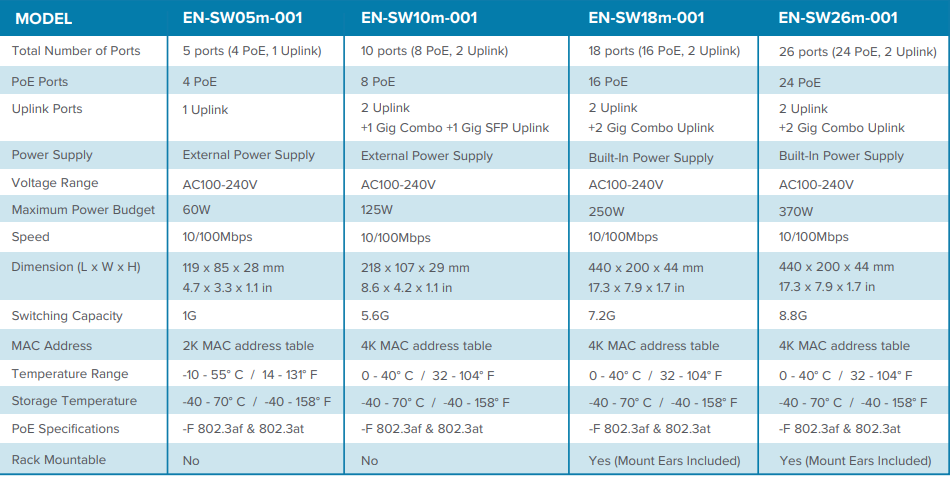
Sky managed Switches (Eagle Eye switches)
- 4,8,16, and 24 port managed poe+ switches
- 100M to 2xGig uplink
Hardened managed switch: SWT-G11MGHP, SWT-F11MGHP
- Environmentally rated, -40 to +75 degree C
- 11 port, 60W POE++
- Multiple SFP ports
- Wall or DIN rail mount installs
Transmission
Partnership with ComNet
Transmission products that enable us to offer a solution for Ethernet over fiber and coax. There are multiple port options as well as hardened POE++ switches as explained in the switch section.
Low hanging fruit to control the project end to end and add supplemental revenue to your projects https://hanwhavisionamerica.com/accessories/networking-and-transmission-accessories/
- Sky managed Switches (Eagle Eye switches)
- 4,8,16, and 24 port managed poe+ switches
- 100M to 2xGig uplink
Hardened managed switch: SWT-G11MGHP, SWT-F11MGHP
- Environmentally rated, -40 to +75 degree C
- 11 port, 60W POE++
- Multiple SFP ports
- Wall or DIN rail mount installs
Product Technology
Compression
All Hanwha IP cameras support H.265 (High-Efficiency Video Coding, or HEVC), H.264 (Advanced Video Encoding, or AVC) & MJPEG compression. We refer to this as Triple Codec. Note – We were one of the first mfrs. to have H.265 in our WN5 SoC in late 2015, but this has since become a fairly standard compression codec with most major mfrs.
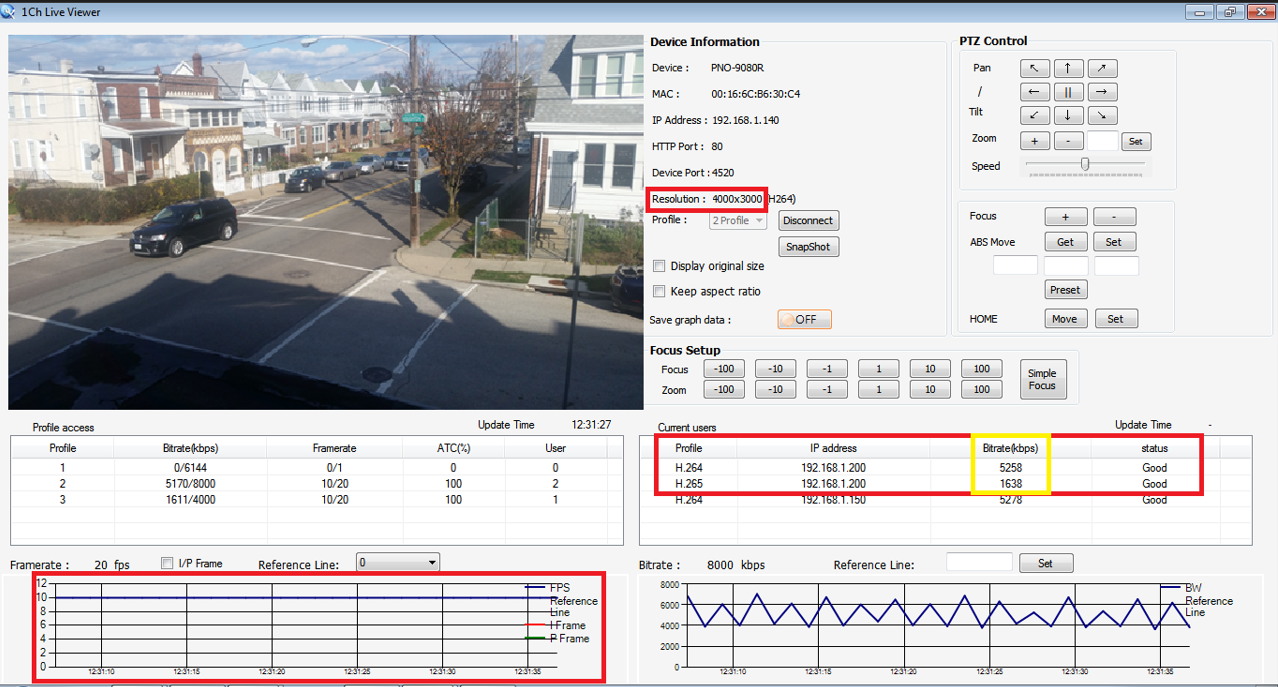
H.265 is approximately 50% more efficient than H.264, sometimes greater depending on the scene. The below example is a 12MP camera at 10FPS which is producing a bit rate of 5.3mbps. in H.264 and 1.6mbps. in H.265
H.265 gets it improved performance over H.264 by the following techniques:
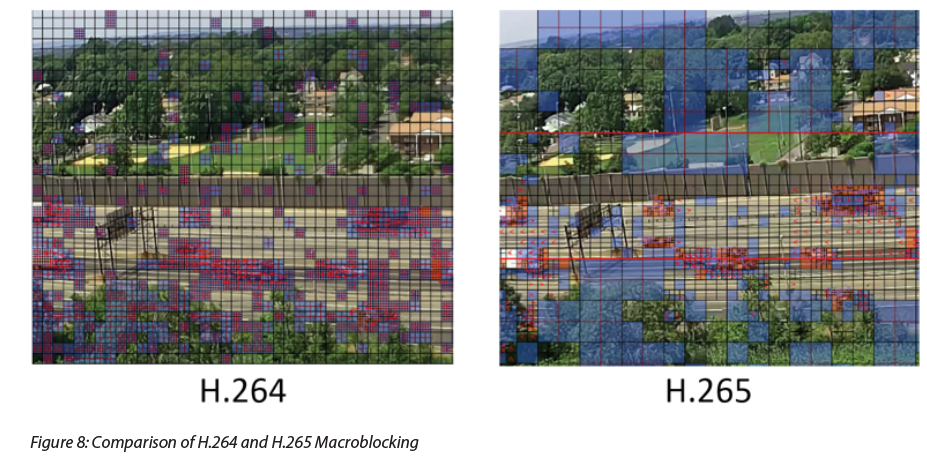
- More efficient/flexible macroblocking:
- Macroblocks are groups of pixels and is one of the underlying mechanisms by which video is transmitted. H.264 was limited to 16 x 16 whereas H.265 can do 64 x 64, which allows the camera to send smaller blocks of pixel change in the P-frame, thus reducing the size of the image/stream.
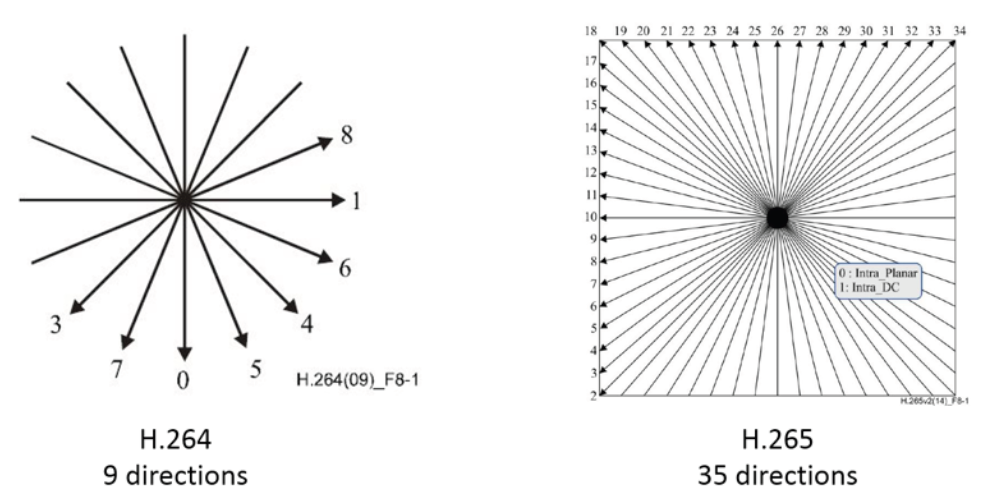
Improved inter-prediction using motion vectors:
- Being able to predict where a moving object will be in the scene is one of the other underlying functions by which video is compressed, in that it is more efficient to transmit a similar-looking block in a new position vs. transmitting an entire new image. H.264 was limited to 9 motion vectors whereas H.265 can do 35.
In addition to H.265, Hanwha introduced our first smart codec, Wisestream, with the WN5 SoC. This codec works with both H.264 & H.265, though more efficient with H.265, and utilizes the following techniques to provide an additional 20-30% reduction in bandwidth, depending on scene activity:
- Dynamic GOV – This technology analyzes motion and complexity in the video and dynamically controls GOV (group of video) length to achieve excellent video quality and low bandwidth consumption.
- Dynamic FPS – In addition to adjusting the GOV length, Dynamic FPS technology is also provided to adjust the number of I-frames being transmitted based on the amount of motion in the scene. Lower motion = less frames being sent = lower bandwidth video.
- Smart Region of Interest (ROI) – This technology analyzes static and dynamic areas of the video based on Hanwha IVA, and applies different levels of compression for both video quality & bandwidth reductions.
- Predictive Bitrate Control – H.265 predicts and calculates the complexity of a scene for compression. Our H.265 has an improved logic for real-time complex calculations byt detecting scene changes ahead of them happening and controlling the compression rate. This prevents unnecessary bitrate increase and optimizes the stream.
Newer WN7 X-series models utilize AI to further help with compression by applying different compression levels based on meaningful objects in the scene, typically people, faces, vehicles & license plates.
Low-light
Hanwha utilizes 3 key technologies to produce high-quality images in low-light scenarios:
- First, in a low light environment, it is critical to design a lens capable of minimizing the loss of light to deliver maximum amount of light to the sensor. Hanwha has been designing & manufacturing our own lenses for 30+ years and have developed industry-leading technology & performance.
- Second, it is necessary to have a high sensitivity sensor which reacts well, even in low light environment.
- Finally, high complexity image processing technology is required. We have developed our own high performance noise reduction technology and image correction technology which maintains brightness, color reproducibility and sharpness in extreme low light environments. We have put together these technologies and named it Smart Super Noise Reduction (SSNR) technology
- Some of our newer X-series WN7 cameras utilize AI to help improve low-light performance with a technology WiseNRII, which reduces noise and drag on AI objects, such a people or vehicles.
WDR
WDR is a technology required in scenes where there are difficult lighting challenges, typically with some part of the scene being bright and some part of the scene being dark. WDR resolves the difference in brightness when the background is brighter than the main object or glare is generated by strong lighting.
There are several technologies that a camera uses to achieve a highly level (rated in db.) WDR:
- Variable/multi exposure, where the camera gathers multiple images of the scene with different exposures (long exposures for the dark areas to let in more light, and short exposures for the bright areas) and blends them together to achieve balance.
- Scene-based Adaptive Tone Mapping, a technology that analyses and reacts to the surrounding images in order to obtain a natural looking image
- Local Contrast Enhancement, which provides a high level of contrast in entire scene, which is a challenge to do alongside WDR.
True can be found WDR in all of our camera series, but the performance in the higher-end lines (X, P & T) will be better than the performance in A, Q & AHD. Please check out our WDR white paper for the technology behind WDR and how it works – https://hanwhavisionamerica.com/wp-content/uploads/Graphics/Whitepapers/Technology_Whitepapers/8._extreme_wdr_whitepaper_en.pdf
Video Analytics
We have an extensive portfolio of license-free analytics that we offer depending on the specific model/camera series. Starting with the A & Q-series, you will find relatively basic video analytic categories such as defocus detection, tamper, motion detection, virtual line detection and enter/exit. As you move into the X, P & T-series, they get a little more advanced, adding loitering, direction detection, appear/disappear, intrusion
There are two primary ways that we can trigger an analytic event; either with pixel-change, or AI.
Pixel-based analytics
- Our A-series, Q-series, T-series, and WN5 all utilize pixel-based video analytics.
- These analytics use pixel change in the scene to initiate the analytic event.
- Because we are relying on pixel change only, these types of analytics can be prone to false alarms and unintended objects accidentally triggering the analytic; things like car head lights, shadows, animals, etc.
AI-based (object classification)
- Our 2nd gen WN7 X-series and some P-Series models utilize artificial intelligence on the edge, based on a machine learning algorithm, and are able to identify & classify certain objects; humans, vehicles, faces & license plates.
- These cameras were essentially “taught” to know these objects and can make decisions based on this information.
- Unlike pixel-based analytics where we are using the movement of generic pixels in the scene to trigger the analytic, with our AI-models we are able to use specific objects (human, vehicle, face & license plates) to trigger the analytic, greatly enhancing the accuracy and significantly reducing false alarms.
Audio Analytics
In additional to video analytics, some Hanwha cameras have license-free audio analytics on the edge as well.
Cameras with this functionality are able to trigger an analytic based on the presence and level of a sound detected in the scene, and in some instances are also able to detect and identify specific types of sounds – gunshots, screaming, breaking glass and explosions – and trigger an analytic based on those sounds being detected. This is called sound classification. These features can be found in most WN5 and WN7 cameras.
- Important – Due to the complexity of how sound behaves in different types of spaces (indoor vs. outdoor, small space vs. large space, etc.) it is highly recommended that a proof of concept (POC) is conducted to ensure the analytic will function properly in that space and that you are setting expectations with the dealer/EU.
Business Intelligence Analytics
Some Hanwha models also have business intelligence analytics on the edge. These analytics are geared for the retail space but can be used in any application where customers want to capture information about visitor density and movements throughout their space and aggregate it into actionable data. These BI analytics consist of the following:
-
- People Counting
- Queue Management
- Heat Mapping (motion based)
Lens Options
Hanwha offers a wide variety of lensing across our different camera series; broken down primarily into two different types; varifocal vs. fixed. With a varifocal lens:
Verifocal:
- You have the ability to adjust the field of view of the camera. For example, a 2.8 – 12mm lens can range from 119 degrees horizontal FOV at it’s widest, all the way down to 28 degrees at its narrowest. Note, the lower the number, the wider the view.
- The large majority of the varifocal lenses we offer are motorized, meaning you are able to adjust the FOV through the camera GUI and not manually on the camera like you used to have to do with older technology.
Fixed lens:
- You have no ability to change the cameras FOV dimensions. For example, a camera with a 2.8mm fixed lens has a horizontal FOV of 113 degrees, and that cannot be adjusted. If a tighter shot is needed, you would need to use a different camera with a different lens.
- The benefit of a fixed lens vs. varifocal is usually cost and form factor; they are typically less expensive by at least 20-30%, and are normally a bit smaller since there are less moving parts as compared to a varifocal camera. BUT, you are limited to the FOV of the camera, and you lose the flexibility of being able to make the view wider or narrower.
HLC
This function masks intense, bright light sources (i.e. car head lights, street lights, etc.) to minimize white out due to over exposure and preserve much of the on-screen details when the camera aims a strong light
To demo this feature, turn on HLC and shine your phone’s flashlight directly into the camera and you will see that the light is masked.
LDCs
Lens distortion correction technology produces natural-looking images without the distortion often created by conventional camera designs equipped with wide-angle lenses. https://hanwhavisionamerica.com/technologies/optical-and-imaging-technologies/lens-distortion-technology/
DIS
Image stabilization technology can reduce the motion blur caused by wind or vibration. A gyroscopic sensor plus DIS technology is specifically designed and engineered into select Wisenet 7 cameras resulting in sharp, stable images. https://hanwhavisionamerica.com/technologies/hardware-technologies/digital-imaging-stabilization-technologies/
As of June of 2022, due to supply chain issues, we have removed the gyrosensor from some models. Check with product management to confirm exact models effective by this.
Modularity Options
Ability to hot-swap cameras and upgrade from 2,4,6,8MP sensors.
Easy installation with modular structure including base, camera module, and cover.
Easily upgrade existing installations to camera modules available with 4K resolution, PTRZ, IR, PoE Extender, or AI based analytics
Multiple housing options including indoor dome, outdoor vandal dome, & flush-mount dome
Access to camera RJ45 port without removing unit from box for efficient programming
Watch video >[Hanwha Techwin] How to use X PLUS Cameras with Modular Structure – YouTube
USB Port
Pre-programing and installation feature. Available in X-series & P-series, & Q-AI Series.
Used with a compatible, optional Wi-FI dongle to enable remote viewing with a cell phone
Meant for installation only.
Watch Video> Hanwha Techwin Wisenet Wi-Fi Installation Dongle – YouTube
PTRZ
(Pan, Tilt, Rotate, Zoom) ease of installation feature. Allows remote lens adjustments via camera GUI or WAVE Client. Saves time on the job and labor required for final programing or customer adjustments.
Confirm IR capabilities. NO IR in single sensor PTRZ
Watch Video > Wisenet P series Multi-sensor PTRZ cameras – YouTube
Environment/Ratings
Definition of terms – IP66/67/Nema4X. Water and dust proofing ratings, which allow installations outside in environments that will gather moisture, dust, and water. NEMA4X is a marine rating for offshore and extremely wet applications. IK10, vandal rating for exterior applications. IP6K9K, food processing and hard chemical ratings.
Look for this in bid specifications
Not all series have the same ratings so be aware of this and check on the product cut sheet.
STEP Dealer Program / Channel Overview
Channel Overview
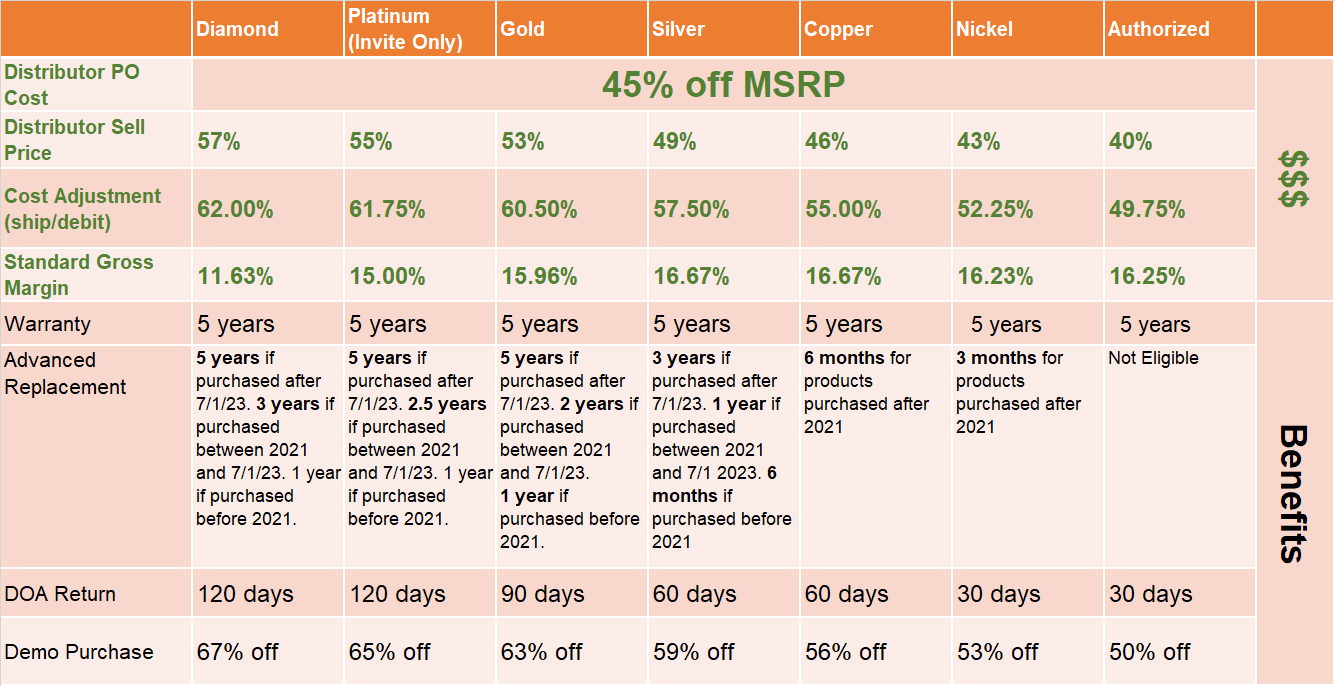
We have 9 strategic national distributors and all of our business flows through them. We do not sell direct to dealers or end-users.
Distributors are discouraged on selling direct to end-users as it disrupts the integrity of the channel.
Regional Distributors
We also have a regional distributor program, (Bronze Plus program) which is focused on growing the # of dealers that are using Hanwha and not currently part of the STEP program.
- In order to capture this business, HTA must have exposure to the dealers and end users that were heavy users of Hikvision and Dahua. Currently, HTA has little to no exposure to these dealers (majority in the SMB space).
- The program aims to capture these new dealers by giving them a competitive advantage on A-series equipment.
- This is an invite-only process, please work with Bronze Plus program manager (Evan Pace).
STEP Partner Program
This program is intended for Channel Partners, System Integrators, Value Added Resellers (VARs) and Installers
STEP stands for Smart Technology Eco Partnership
Partners enroll through the Partner Portal and are accepted as Authorized into the program. Any upgrades based on the discretion of the Regional Sales Manager and can be done after the partner is Authorized level. See Sugar Knowledgebase for details on how to change a partner level.
Enrollments are vetted by the STEP Program Manager. If they cannot determine if the partner meets the criteria, they will contact the RSM via email for confirmation.
The RSM will get notified through Sugar once a partner is enrolled. They will also receive a weekly PDF report showing the partners that enrolled in the last 7 days.
For a high-level overview of the program visit > Partner Portal – Hanwha Techwin (hanwhavisionamerica.com)
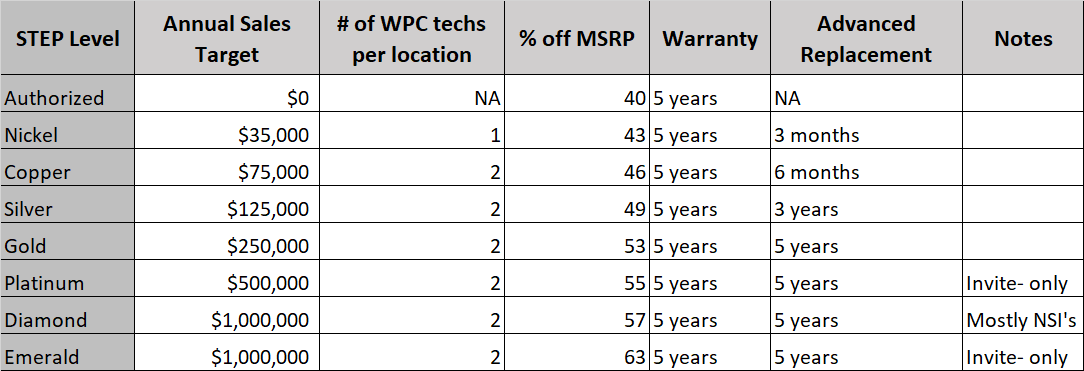
Requirements
Benefits
Refer to the Benefits page > Employee – SC0001_EM – Hanwha Partner Portal
Advanced Replacement Process
As part of our STEP program, dealers are eligible to receive exchanges on all IP cameras and NVR’s for a time period based on their partner level. See “Dealer Levels & Benefits” section for specifics. There is no charge for this process, provided the original product is returned within 15 days of the shipment date and has not been misused or improperly handled. Link HERE.
A credit card is required to secure requests for advanced replacement units. If the defective unit is not received by the Repair Center within 15 days of the replacement unit’s ship date or the returned unit is physically damaged, the credit card on file is automatically charged at 60% off the product’s MSRP.
Upon receipt of an approved Advanced Replacement request, HTA will overnight replacement product (can be new, can be refurbished) with a pre-printed return label for the dealer to use to send back the faulty equipment.
RMA Process
As part of our STEP program, dealers are entitled to in-warranty repairs from the purchase date on NVR’s and IP camera purchases made after 3/1/17. Authorized has a 3-year warranty and all other levels have a 5-year warranty. This warranty process would be used if there is an equipment issue that falls outside of the Advanced Replacement period.
The RMA process is handled by the integrator or distributor through the partner portal, link
The customer is responsible to ship the defective unit prepaid to the repair center. Hanwha returns the unit via prepaid UPS Ground Service
Training
Hanwha offers different levels of training for our partners:
- Wisenet eLearning Institute – Self-paced training
- Virtual Video Professional Certification – Offered weekly, virtual lab environment
- In-person Video Professional Certification Program
- Monthly webinars
- One-off in person training led by FAE/RSM
- YouTube training videos
All STEP partners are required to have 2 certified technicians.
Project Registration
What is it?
Project Registration is reward of the STEP Partner Program and it’s a mechanism to incentivize and reward positive behavior…getting Hanwha Techwin spec’d in or converted on a particular opportunity.
Project Registration provides a set discount based upon the project value. Project value is calculated at list price.
Who should get it?
Project Registration discounts should be provided to those partners who are leading and driving the Hanwha Techwin solution sales. Only STEP Partners are eligible for project registration consideration.
Who should not get it?
Discounts should not be provided to anyone not directly influencing the end user and / or ACE to get Hanwha Techwin specified on a particular project. Responding to a bid does not warrant a project registration discount. Non STEP partners are not eligible for project registration consideration.
What discount can be offered?
Project Registration provides a set discount based upon the project value. Project value is calculated at list price. The discount offered is dependent on the STEP’s assigned status (Diamond, Gold, Silver or Authorized) and the list price value of the project.
What information is required for project registration consideration?
The project registration request form identifies the information that is required for project registration consideration. Two important components include:
- what STEP activity is driving the Hanwha solution and
- an estimated project timeline is needed for sales and inventory planning purposes.
Competitive situation?
In cases of a competitive situation where Hanwha Techwin is not hard spec’d, meet competitive price offer rather than project registration can be utilized
Once approved, how does a STEP partner receive their discounted price?
In order to receive the approved project registration price, the STEP partner will purchase the product from an Authorized Distributor.
At the time of project registration request, the STEP partner must identify the Authorized Distributor that they intend to purchase from. Project registration offers are not transferable from one distributor to another by the STEP partner.
The Authorized Distributor is expected to fulfill the STEP order at the agreed upon price as per the project registration program guidelines.
Once approved, how does a STEP Authorized Distributor receive their discounted price?
The Authorized Distributor reports the sales made to STEP partners on monthly POS reporting to Hanwha. Hanwha reimburses the Authorized Distributor monthly by chargeback / price deviation / ship & debit process.
Who are quotes provided to?
Quotes are provided to Distribution. The Regional Sales Manager will cc on all quote emails
How long are quotes issued for?
Quotes are issues for 90 days after requested date. Extension can be granted with direction and approval from the Regional Sales Manager. Projects will only be extended 2 times. After that, a new project is required
Type of Project Registrations
Project registrations can be submitted through the partner portal by either the dealer, distributor or rep firm.
We have 3 main types of project registrations:
STEP Partner Registration
This process is used when the dealer brings a project to Hanwha and is looking for price protection.
We only allow one dealer and one distributor per each project registration.
There is a pre-defined matrix that determines discount based on project size and STEP dealer level. DO NOT SHARE THIS MATRIX WITH ANYONE.
Competitive Registration
This is similar to a STEP partner registration but there is no pre-defined matrix, and we have the ability to suggest discounts based on the competitive landscape of the opportunity. Multiple dealers can be involved in a single competitive registration.
Distributor Registration
This process is used when the distributor drives the project to Hanwha, and we would have otherwise not been involved. We need to vet these registrations to make sure that they are actually driving this business to us. In this scenario, we give the distributor extra discount and they can choose to do with it what they please.